
Digital Legacy Planning: What It Is and How to Start
Most people have a will for their house and savings, but almost nobody has a plan for their Facebook account, their photo library, or the email inbox holding decades of memories. That gap is what digital legacy planning covers, and it's becoming just as important as any other part of estate planning. If you've started wondering what happens to your online accounts, subscriptions, and files after you're gone, you're already ahead of most people who never ask the question until it's too late.
This article gives you a straightforward answer: what digital legacy planning actually means, which assets it covers, and the practical steps to organize everything so your family isn't left guessing passwords or losing photos forever. We'll walk through account inventories, password managers, legal considerations, and how to designate someone to carry out your wishes.
We'll also touch on something people often overlook: planning how you'll be remembered, not just how your accounts get closed. Tools like a digital memorial page let your story, photos, and life timeline memorial live on in a place your family can actually visit and share, which is part of a complete legacy plan, not an afterthought.
Why digital legacy planning matters
When someone dies without a plan for their online life, the fallout lands on the people left behind. Grieving families end up locked out of email accounts that hold years of photos, unable to close subscriptions that keep charging a dead person's credit card, and stuck submitting death certificates to tech support teams who barely respond. This isn't a hypothetical problem. Facebook alone hosts hundreds of millions of profiles belonging to deceased users, and that number grows every year as the platforms that host our lives age along with us.
A will protects your house and savings. Digital legacy planning protects everything you left in the cloud.
The accounts nobody thinks about until it's too late
Most people picture email and social media when they hear "digital assets," but the list is much longer. Cryptocurrency wallets, cloud storage, domain names, loyalty points, online businesses, and even smart home systems all need a plan. Without one, digital estate planning gaps can mean real financial loss, not just inconvenience:
- Cryptocurrency with no recorded private key becomes permanently unreachable
- Paid cloud storage can be deleted by the provider after months of inactivity, taking irreplaceable photos with it
- Small online businesses lose customer access and revenue while heirs fight with support tickets
- Subscription services keep billing a closed bank account until someone notices
Families need clarity, not guesswork
Beyond money, there's an emotional cost. Spouses and adult children often don't know which accounts existed, let alone the passwords to reach them. That uncertainty adds stress at the worst possible time, when people are already exhausted and grieving. A clear plan removes the guesswork, so loved ones after your death can focus on remembering you instead of hunting through old emails for a login reset link.
There's also a legal layer to this. Many platforms have terms of service that make it difficult for anyone but the account owner to access data, even with a death certificate in hand. Estate planners and solicitors increasingly flag digital assets as a blind spot in traditional wills, because the law hasn't fully caught up with how much of our lives now lives online. Planning ahead closes that gap before it becomes someone else's problem.
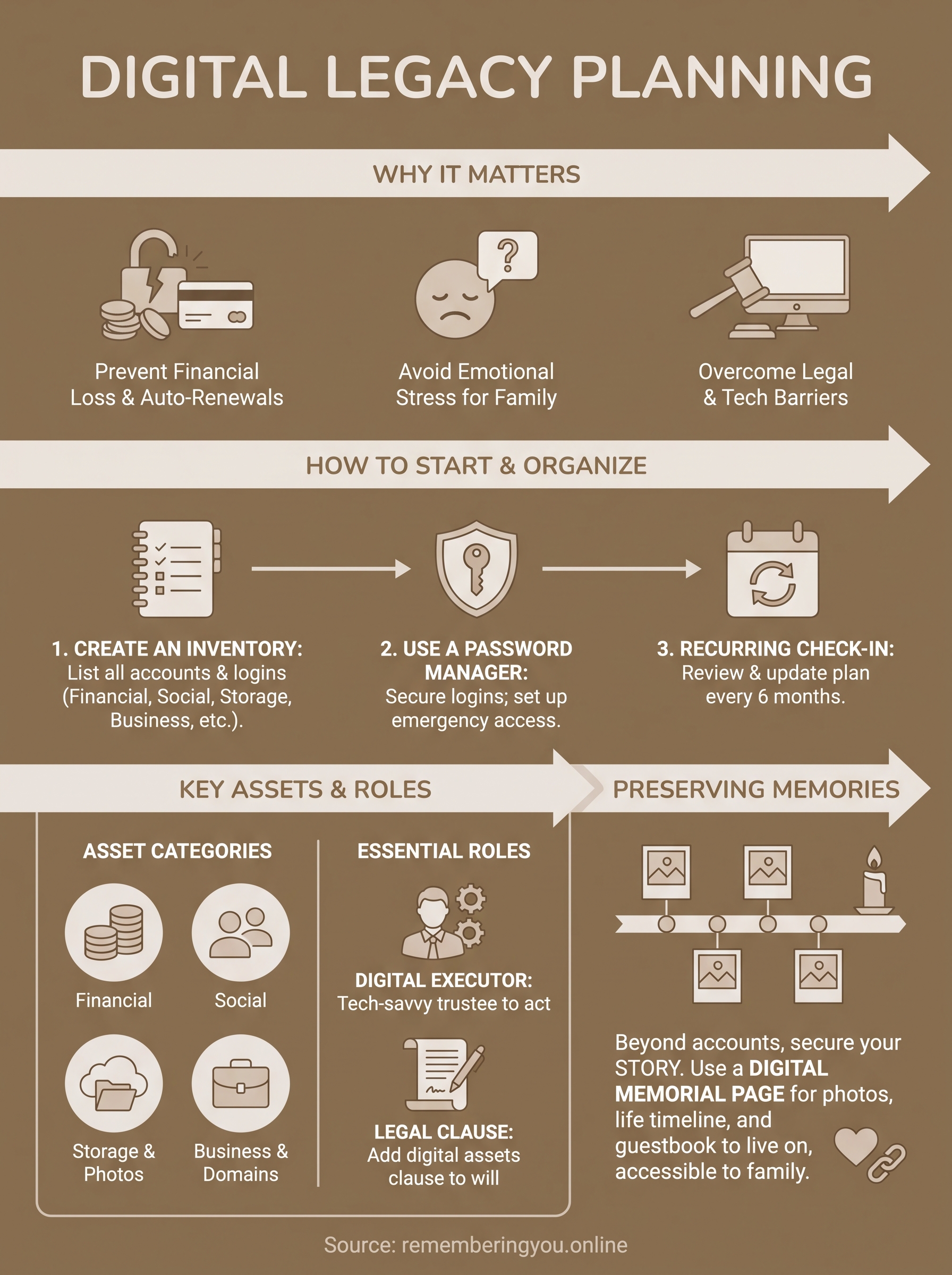
How to start your digital legacy plan
Starting feels harder than it actually is. You don't need a lawyer or a fancy app on day one, you just need thirty focused minutes and a notebook or a document you trust. Digital legacy planning works best when you break it into small, repeatable steps instead of trying to map your entire online life in one sitting.
Start with a simple list
Begin by listing every account you can think of off the top of your head. Don't worry about passwords yet, just names: email providers, banks, social media, streaming services, cloud storage. This first pass usually surprises people, most of us have thirty to fifty accounts we've forgotten about entirely.
You can't protect an account your family doesn't know exists.
Pick one tool to hold it all
Once your list exists, password managers like Bitwarden or 1Password give you one secure place to store logins and, importantly, an emergency access feature that lets a trusted person unlock everything after your death. This single step solves the biggest problem families face: not knowing where to even look.
Set a recurring check-in
After that, treat the plan like a living document, not a one-time project:
- Add new accounts as you open them
- Remove closed ones
- Update passwords in your manager whenever you change them
- Review the whole list twice a year, maybe alongside a birthday or New Year's resolution
Quick action beats a perfect plan you never finish. Get the basics down this week, then refine them over time as part of your broader digital estate planning routine.
What to include in your digital asset inventory
A complete digital asset inventory covers more than logins. Think of it as a map of everything you own, access, or manage online, sorted by type so your executor knows where to look and what each account is worth. Skipping a category is how families lose money or memories they never knew existed.
If it has a login, it belongs on the list.
Group your assets by category
Organizing by type makes the list easier to hand off and easier to keep current. Here's a starting structure:
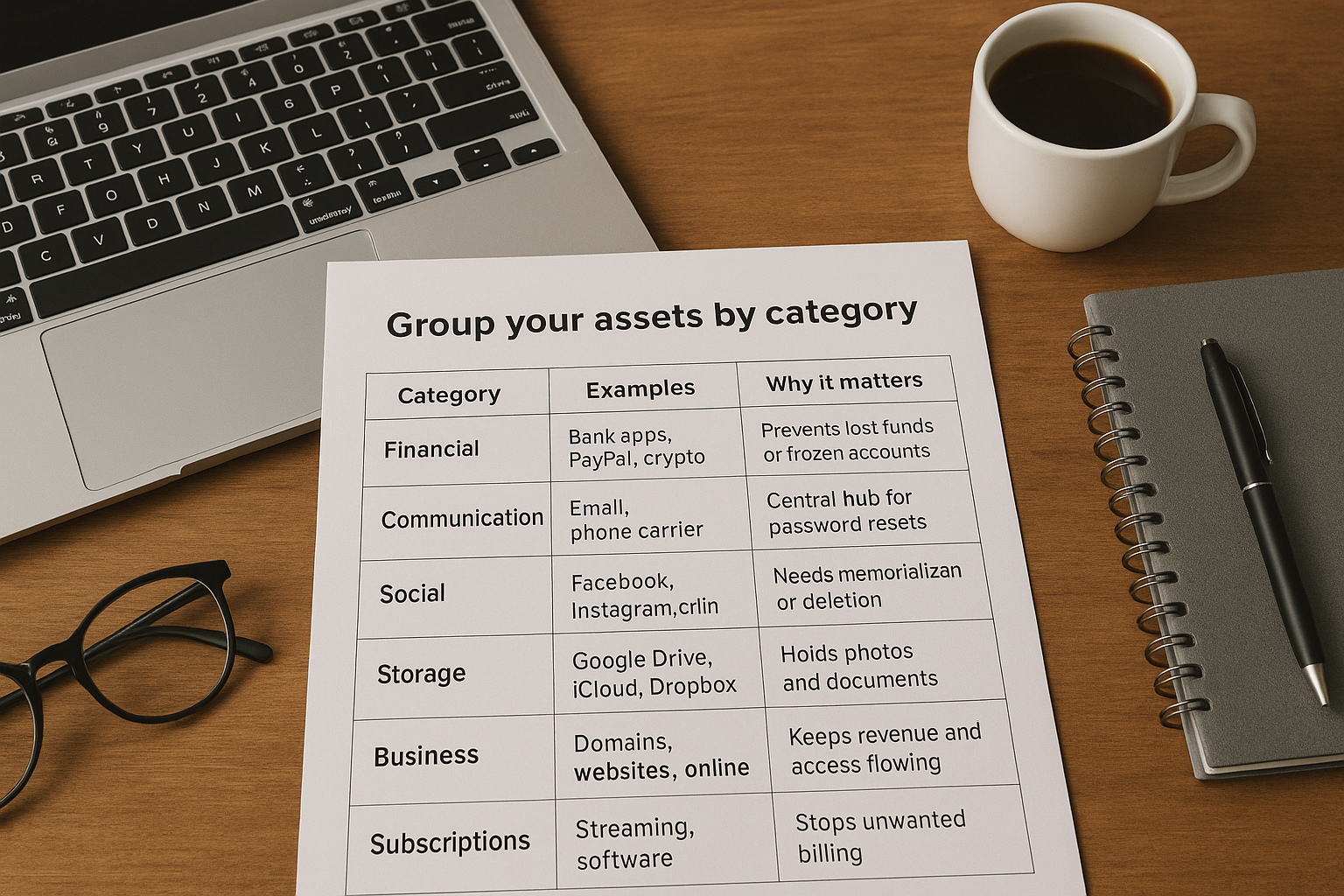
| Category | Examples | Why it matters |
|---|---|---|
| Financial | Bank apps, PayPal, crypto wallets | Prevents lost funds or frozen accounts |
| Communication | Email, phone carrier | Central hub for password resets |
| Social | Facebook, Instagram, LinkedIn | Needs memorialization or deletion |
| Storage | Google Drive, iCloud, Dropbox | Holds photos and documents |
| Business | Domains, websites, online stores | Keeps revenue and access flowing |
| Subscriptions | Streaming, software, memberships | Stops unwanted billing |
Don't forget the sentimental assets
Beyond finances, your online accounts hold years of photos, videos, and messages that matter more to your family than any password. List where these live specifically, not just "cloud storage," but the exact service and folder. Note which files matter most, so nobody has to dig through thousands of images to find the ones worth keeping. Pairing this inventory with a dedicated place to preserve those stories, like a memorial page, gives your family somewhere to actually enjoy what you saved instead of just archiving it.
Choosing a digital executor and legal steps
Someone has to actually do the work of closing accounts, transferring files, and shutting down subscriptions, and that person is your digital executor. Pick someone tech-comfortable and trustworthy, not necessarily the same person named in your traditional will, though it often works out that way. Tell them directly that you've chosen them. A surprise appointment after death only adds confusion to an already hard week.
Your digital executor can only help if they know the job exists before you're gone.
Naming someone you trust
Give this person more than a title. Walk them through where your password manager lives, how to reach your digital asset inventory, and which accounts need urgent attention first, like anything tied to active billing. Some platforms let you formalize this ahead of time: Google's Inactive Account Manager lets you name a trusted contact who gets access after a set period of inactivity, which is worth setting up regardless of your age.
Making it legally binding
Beyond informal instructions, put your wishes in writing where they carry legal weight:
- Add a digital assets clause to your will naming your executor and referencing where the inventory is stored
- Check your state's stance on the Revised Uniform Fiduciary Access to Digital Assets Act, which many states have adopted
- Consult an estate attorney if you own a business, cryptocurrency, or high-value domains
A short conversation with a lawyer now saves your family months of legal back-and-forth later, and it locks your digital legacy planning into something courts and companies will actually honor.
Preserving memories for the people you love
Accounts and passwords are the practical half of digital legacy planning, but they're not the part your family will actually revisit years from now. Nobody sits down on an anniversary to admire a closed PayPal account. What they want is your voice, your photos, the stories only you could tell. That's why preserving memories deserves its own place in your plan, separate from the administrative checklist.
Closing accounts protects your estate. Preserving memories protects your story.
Give your stories a permanent home
Scattered photos in a cloud folder get lost the moment nobody remembers the login. Setting up a memorial page for a loved one solves that by giving your life story, photos, videos, and a timeline of milestones a single place your family can visit whenever they want, not just after a funeral. Platforms like Remembering You let you build this ahead of time or let family create one afterward, complete with a shareable link and an online memorial guestbook where relatives scattered across different cities or countries can leave their own memories.

Make it easy to find and easy to keep
Add the memorial page link to your digital asset inventory alongside your other accounts, so your executor knows it exists. Many families also print the page's QR code onto a headstone, memorial card, or keepsake frame, so anyone who finds it can scan and land directly on your tribute. That small step turns a private photo library into something lasting, public when you want it to be, and impossible to lose the way a forgotten hard drive can be.
Taking the first step today
Digital legacy planning doesn't require a lawyer, a weekend, or a perfect system on day one. It just requires starting: list your accounts, pick a password manager, name someone you trust, and put it in writing where it counts. Every step you finish now is one less thing your family has to untangle while they're grieving.
Grieving is hard enough without hunting for passwords or wondering if the photos survived. Digital legacy planning gives your family clarity, but it also gives you a chance to shape how you're remembered, not just how your accounts get closed. That's the part worth doing today, not someday.
Start small. Open a document, write down your first ten accounts, and then take the next step: start a free memorial tribute page at Remembering You so your story has a lasting home your family can actually visit.