
7 Free Memorial Website Templates for a Lasting Tribute
You want to create an online tribute for someone you loved, but you don't want to spend hours designing it from scratch or paying monthly fees for something that should feel permanent. Searching for a memorial website template usually means you're staring at a blank page, unsure how to organize photos, a life story, and a way for family to leave messages, all while grieving. That's a lot to ask of anyone.
This article gives you exactly what you're looking for: real, usable free memorial website templates you can start with today, no design skills required. Each one is built to hold what matters most, photos, a timeline of milestones, and a guestbook where friends and family can share memories, whether they're in the same town or scattered across the world.
Below, you'll find seven templates ranging from simple and quiet to detailed and story-driven, including options suited to religious families who want prayer and candle-lighting features. We'll walk through what each free memorial website template offers, who it fits best, and how to get one live in minutes without touching a credit card.
1. Remembering You
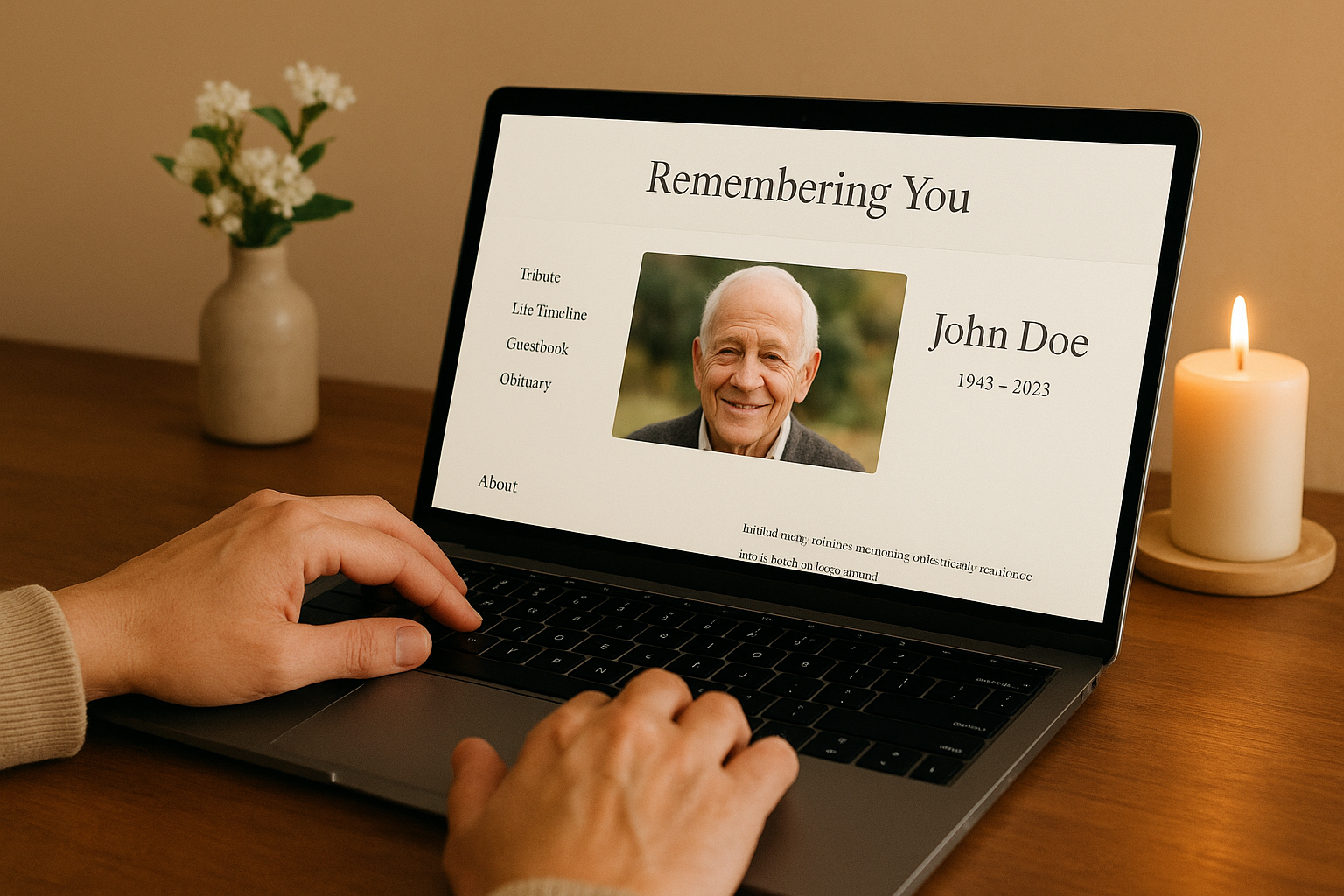
Remembering You is built specifically as a free memorial website template platform, not a generic site builder stretched to fit a new purpose, and it holds up well when you compare the free memorial website options side by side. You create an account, pick a layout, and start adding photos, a biography, and a life timeline without ever hitting a paywall for the basics. The platform was designed around what grieving families actually need: a place that feels personal, loads fast on a phone at a graveside, and doesn't ask for a credit card just to get started.
Key features
What sets this template apart is how much comes included at no cost, and how it bridges the physical and digital sides of remembrance.
- Customizable tribute pages with unlimited photos, videos, and a written biography
- Life timeline to document milestones chronologically, from childhood to final years
- Shared guestbook where family and friends leave memories and condolence messages
- Unique scannable QR code you can add to headstones, memorial cards, or photo frames
- Prayer intentions board, virtual candles, and flower tributes for Catholic and Christian families
- Privacy controls to keep a memorial private or open it to everyone
- Support for memorials for pets, not just people
A memorial page only works if the people who need it can actually find it, which is why the QR code feature matters more than most templates admit.
Who it's best for
Families spread across different cities or countries get the most out of this template, since everyone can visit and contribute from anywhere. It also suits Catholic and Christian households who want prayer and candle features built in, along with funeral homes and celebrants who recommend aftercare tools to grieving families. Pet owners looking for a free memorial website template built with animals in mind will also find a natural fit here.
Pricing
Account creation and the core template are free with no credit card required. A one-time lifetime upgrade of $24.99 unlocks every feature permanently, with no recurring subscription ever charged again, and you can see what a digital memorial actually costs before you decide. That single payment structure matters if you've already dealt with a subscription service that quietly raised its price after the first year.
How to get started
Getting a page live takes less time than writing an obituary. Head to Remembering You and sign up for free, choose a template, then follow the steps for putting a memorial page together by uploading photos and starting the biography. You can invite family to contribute to the guestbook the same day, and generate the QR code whenever you're ready to add it to a headstone or memorial card.
2. Wix memorial website templates
Wix offers a general website builder with a handful of templates that people repurpose for memorials, mostly pulled from its events or personal blog categories. You start with a blank canvas or a loosely related template, then drag in photo galleries, text blocks, and embedded video to shape something that resembles a tribute page. It works, but you're the one doing the design labor that a purpose-built memorial website template would already have solved.
Key features
Wix gives you full creative control over layout, fonts, and color, plus drag-and-drop photo galleries and video embeds. You can add a contact form to collect messages, though it functions nothing like a real guestbook built for condolences.
A drag-and-drop builder gives you flexibility, but flexibility isn't the same as a template made for grief.
Who it's best for
This route suits someone comfortable with design work and willing to spend a few hours building a page from scratch. It's a poor fit for anyone hoping for a free memorial website template with prayer features, a QR code, or a life timeline already built in.
Pricing
Wix's free plan carries Wix branding and ads, plus a clunky subdomain. Removing ads and connecting a custom domain requires a paid plan starting around $16 a month, billed as an ongoing subscription.
How to get started
Sign up for a free Wix account, search their template library for an events or personal page layout, then customize each section manually before publishing.
3. WordPress memorial themes
WordPress powers a huge share of the web, and that includes a scattering of memorial-specific themes sold through marketplaces like ThemeForest, alongside free options in the official WordPress theme directory. You install WordPress yourself, pick a theme built around obituaries or tribute pages, then configure plugins to handle photo galleries and comments. It's more capable than a locked-down builder, but it also means you're managing hosting, updates, and security instead of just writing a life story.
Key features
Memorial-focused WordPress themes typically include an obituary layout, a photo gallery, and a comments section repurposed as a guestbook. Some themes bundle a timeline plugin and let you add a condolence form, though a true memorial website template free of extra setup is rare here since everything runs through separate plugins you configure yourself.
Full control over a WordPress site is only useful if you actually want to manage a website, not just publish a tribute.
Who it's best for
This path fits people with prior WordPress experience, or those willing to learn hosting and plugin management during an already difficult time. It's not ideal for someone who wants a page live today without technical setup.
Pricing
WordPress software itself is free, but you'll pay for hosting (often $5 to $15 monthly), a domain name, and possibly a premium theme costing $30 to $60 one time.
How to get started
Purchase hosting, install WordPress through your host's dashboard, then search the theme directory or a marketplace for a memorial layout before adding your content and plugins.
4. Squarespace memorial templates
Squarespace is known for polished portfolio and business templates, and some families borrow its photography or blog layouts to build a memorial page. You pick a visually clean template, swap in photos and text, then adjust the navigation so it reads like a tribute instead of a portfolio. The design quality is genuinely nice, but nothing in the template library was actually built as a memorial website template, so you're reshaping something meant for a different purpose.
Key features
Squarespace templates give you elegant typography, full-bleed photo galleries, and smooth mobile scrolling. You can embed video and add a simple contact form, but there's no guestbook, no timeline feature, and no candle or prayer tools built in.
A beautiful layout doesn't replace the features grieving families actually need to gather memories in one place.
Who it's best for
This option suits someone with a design eye who wants a visually striking page and doesn't mind building guestbook or timeline functionality through third-party embeds. It's a weaker fit for families searching for a free memorial website template they can set up quickly without extra tools.
Pricing
Squarespace has no permanently free plan. Paid tiers start around $16 a month billed annually, and that's before a custom domain, which usually costs extra.
How to get started
Start a free trial, choose a photography or blog template, then restructure the pages and navigation to fit a tribute before your trial converts to a paid plan.
5. Forever Missed
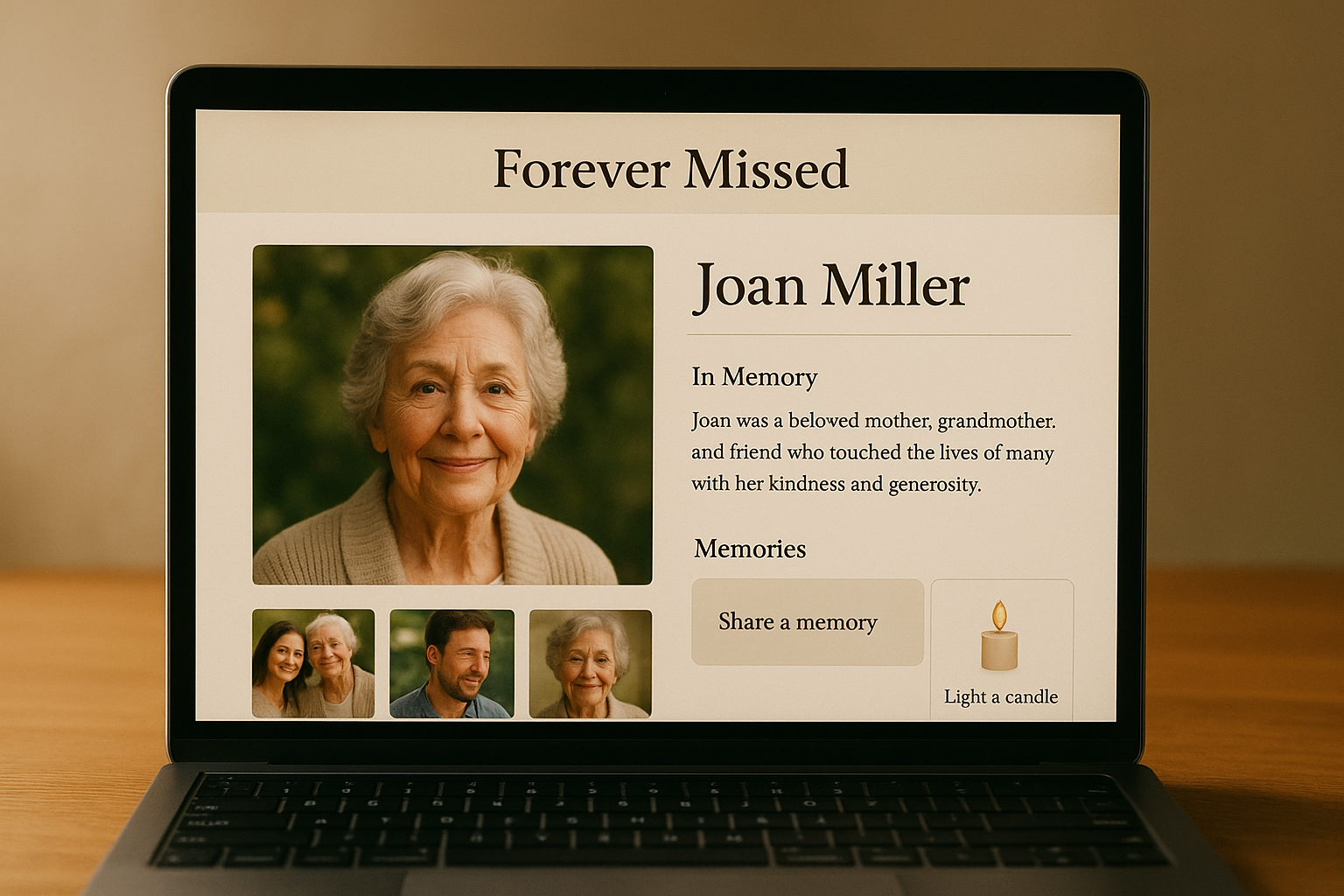
Forever Missed is one of the older dedicated memorial sites online, built specifically for tribute pages rather than repurposed from a general builder. You create a page with a photo, a short biography, and open it up for others to add their own memories and photos over time, which makes it feel more like a shared scrapbook than a single-author tribute. It's a solid example of a memorial website template built with grief in mind from the start.
Key features
The core page includes a photo gallery, a memories wall where multiple contributors can post stories, and a candle-lighting feature for visitors to leave a symbolic gesture. There's no life timeline or QR code option here, and prayer-specific tools for Catholic or Christian families aren't part of the base design.
A memorial that invites many voices only works if the platform actually makes room for all of them, not just one author.
Who it's best for
Large extended families who want many people contributing photos and stories over months or years will find this setup useful. It's a weaker fit if you specifically want a free memorial website template with a QR code for a headstone or physical marker.
Pricing
Basic pages are free, but storage and extra photos are limited until you pay for an upgrade, priced around $19.99 a year rather than a one-time fee, which is worth weighing if you're still deciding whether a paid memorial site is worth it.
How to get started
Create a free account, start a memorial page, then invite family by email so they can add their own photos and memories directly.
6. CreateMemorial free templates
CreateMemorial is a smaller, no-frills memorial site builder that leans on a handful of preset layouts rather than heavy customization. You pick one of its free templates, fill in a name, dates, and a short tribute, then publish a page that looks similar to thousands of others on the platform. It's a bare-bones option if you just need something simple posted quickly, closer in spirit to the printable funeral program templates families download for a service, and it doesn't try to be a full-featured memorial website template like the platforms built specifically for grieving families.
Key features
Each template includes a single photo header, a text block for the obituary or tribute, and a basic comment section standing in for a guestbook. There's no life timeline, no QR code generator, and no candle or prayer tools, so what you see at signup is largely what you get.
A free template only helps if it still lets you add what matters, not just a name and a date.
Who it's best for
Someone who wants a minimal placeholder page fast, without customizing much beyond the basics, fits here best. Families hoping for a free memorial website template with a timeline, prayer board, or QR code will outgrow it quickly.
Pricing
Basic pages cost nothing, though extra photo storage and removing ads requires a paid tier priced around $9.99 a month.
How to get started
Register with an email address, choose a template, then fill in the name, photo, and tribute text before publishing the page publicly.
Choosing the right tribute for your loved one
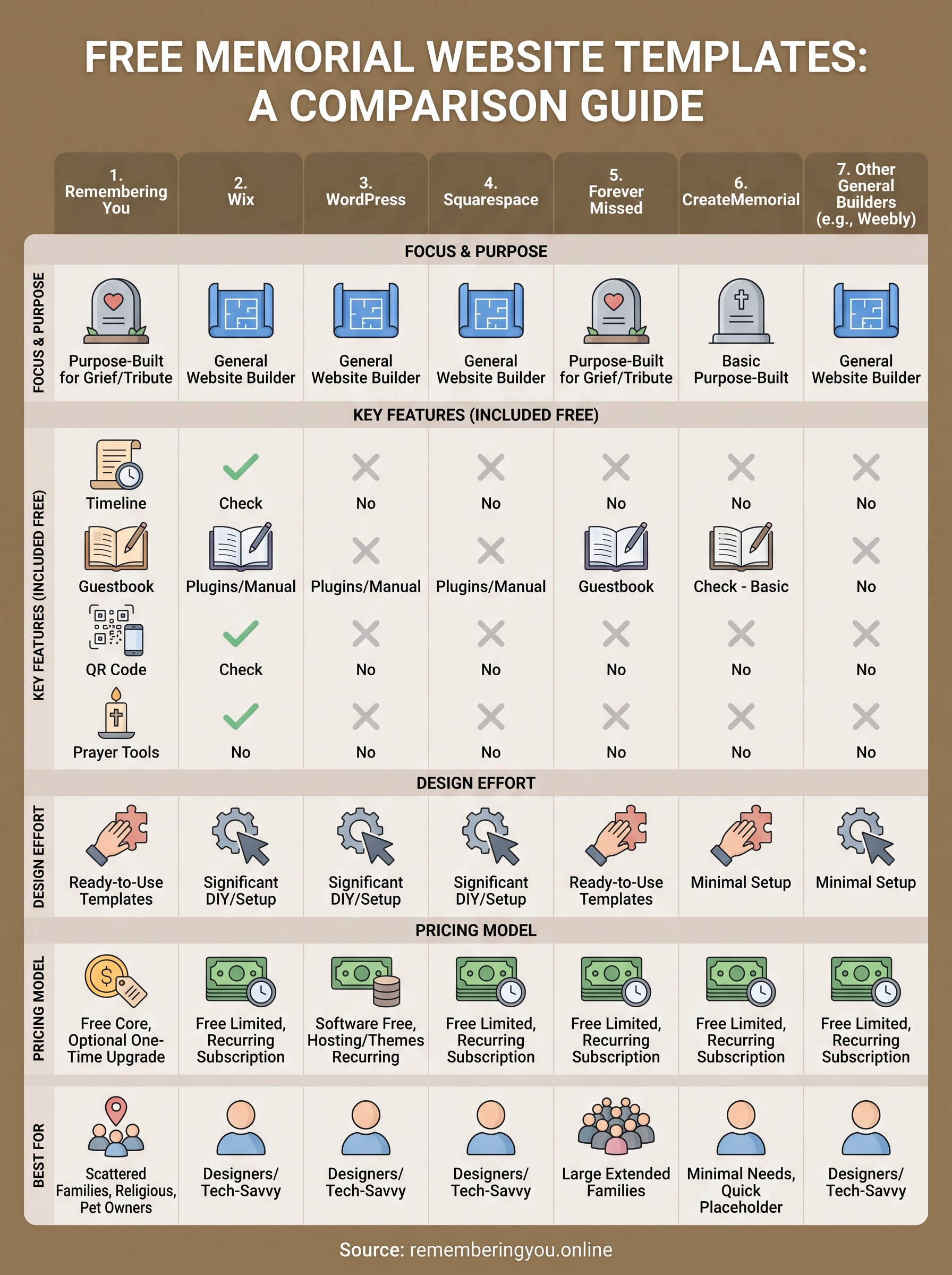
Every option in this list can technically hold a name, a photo, and a few words. But the right memorial website template depends on what you and your family actually need six months or six years from now, not just today. Generic builders like Wix or Squarespace ask you to build features from scratch, while WordPress hands you a website to maintain on top of your grief. Dedicated platforms skip that work entirely.
For most families, a free memorial website template that already includes a guestbook, a timeline, and a way to bring the memorial into the physical world through a QR code will outlast the alternatives, both in features and in your patience. That's exactly what Remembering You was built for.
If you're ready to give your loved one a tribute that's actually built for this moment, start a digital memorial tribute page with photos, a life story, and a guestbook on Remembering You today.