
8 Best Digital Vaults for Estate Planning in 2026
Sorting out who gets your passwords, deeds, and insurance policies after you're gone shouldn't be a scavenger hunt for your family. Yet that's exactly what happens without a plan for your digital estate, when documents live in a drawer, an old email account, or nowhere at all. If you're searching for the best digital vaults for estate planning, you already know the stakes: one missed document can delay probate for months and add stress to a family that's already grieving.
This guide gets straight to the point. We compared the top platforms on security, ease of setup, document types supported, and how well they hand off access to heirs when the time comes. Whether you need a simple digital vault estate planning tool for wills and account logins, or something more robust for trusts, deeds, and business records, you'll find an option that fits your situation and your budget.
We also look at what happens after storage, because legal paperwork only tells part of a life's story. An estate planning digital vault can protect your documents, but pairing it with a free memorial page for photos and stories lets your family preserve the memories, photos, and moments that matter just as much as the paperwork.
1. Everplans
Everplans has been around longer than most digital estate platforms, and it shows in how thorough the document library feels. It works less like a simple file locker and more like a guided project, walking you through what to gather for wills, funeral wishes, insurance, and even pet care instructions. If you want a digital vault estate planning tool that also teaches you what you're missing, this is one of the more complete options on the market.

Key features
The platform organizes your information into categories, then prompts you with checklists so nothing falls through the cracks. Deputy access lets you assign trusted people, like a spouse or adult child, who can view specific sections now or gain full access after you pass, verified through a documented process rather than a simple password handoff. You also get storage for scanned documents, account logins, and step-by-step instructions for tasks heirs often struggle with, like closing a Facebook account or finding a safe deposit box.
- Guided planning checklists for wills, funeral arrangements, and family logistics
- Tiered deputy permissions (view-only vs. full access after death)
- Secure document upload for wills, deeds, and insurance policies
- Advance directive and healthcare wishes storage
- Employer and financial advisor partnership options for benefits programs
A vault only helps your family if someone else already knows how to open it.
Pricing
Everplans doesn't publish a single flat rate the way some newer competitors do. Individual access is typically offered through employer benefits, financial advisors, or funeral homes that license the platform and pass it along to clients or employees at no direct cost. When purchased directly, pricing has historically landed in the range of $75 to $300 depending on the plan and whether it includes advisor support. That makes it worth checking with your bank, insurer, or HR department before paying out of pocket.
Best for
Everyplans suits people who want structure more than speed. If you're the type who needs a checklist to feel confident you haven't missed a document, or if your employer or financial institution already offers it as a perk, it's a strong fit. Families juggling complex estates, multiple properties, or blended family arrangements also benefit from the deputy system, since it lets you control exactly who sees what and when, rather than handing over one master password to everyone at once.
2. GoodTrust
GoodTrust built its name on digital legacy planning, meaning it focuses heavily on what happens to your online accounts, from Instagram to cryptocurrency wallets, after you pass. It pairs that with more traditional estate documents, so you get a hybrid tool that feels modern without ignoring the paperwork side of things. For anyone whose life is scattered across dozens of logins and subscriptions, this estate planning digital vault fills a gap that older platforms often miss.
Key features
GoodTrust's standout feature is its digital account inventory, which catalogs everything from social media to streaming services and gives your executor instructions for closing or memorializing each one. It also includes will creation tools, a secure vault for documents, and a legacy contact system that mirrors what platforms like Google and Facebook already use for account succession.
- Digital account and subscription inventory with closure instructions
- Built-in will and power of attorney document generator
- Secure vault for uploading wills, deeds, and financial records
- Legacy contact assignment for social media and cloud accounts
- Free "Digital Legacy" plan for basic account management
Your passwords are worth nothing to your family if nobody knows they exist.
Pricing
GoodTrust offers a free tier that covers basic digital account planning, which makes it accessible if you just want to get started. Paid plans run $9.99 to $19.99 per month, or you can pay annually for a discount, and they unlock full estate document creation, unlimited storage, and priority support. There's no lifetime option, so ongoing subscribers should factor in the long-term cost compared to one-time-fee alternatives.
Best for
GoodTrust fits people whose digital footprint is as complicated as their physical one. If you've got cryptocurrency, multiple social accounts, or subscriptions your family wouldn't know to cancel, this platform handles that mess better than most competitors on this list.
3. Trustworthy
Trustworthy takes a family-office approach to estate organization, aiming at households with more moving parts than a simple will and a savings account. It leans on bank-level encryption and a clean interface to organize everything from property deeds to family recipes, positioning itself as a secure estate planning digital vault for people who want one home base for the whole family's paperwork, not just the legal basics.
Key features
The platform centers on a shared family vault where multiple members can upload and organize documents by category, from insurance and taxes to medical records and personal keepsakes. Role-based sharing lets you decide who sees what, so a sibling handling finances doesn't need access to health directives meant for a spouse. Trustworthy also includes a professional network feature, connecting you with vetted estate attorneys and financial advisors directly through the platform.
- Shared family vault with category-based document organization
- Role-based permissions for spouses, children, and advisors
- Directory of vetted estate attorneys and financial professionals
- Secure messaging between family members and advisors
- Mobile app for photographing and uploading documents on the go
A vault built for one person rarely survives contact with a real family.
Pricing
Trustworthy runs on a subscription model, with plans starting around $120 per year for individuals and higher tiers for families needing more storage and advisor access. There's no free version beyond a limited trial, so you'll want to test the interface before committing to a full year.
Best for
Trustworthy suits multi-generational households already juggling shared responsibilities, like adult children helping aging parents manage paperwork. If your family needs several people working inside the same vault rather than one person controlling everything, it's worth the subscription cost.
4. Prisidio
Prisidio markets itself as a security-first alternative for people who worry about data breaches more than they worry about ease of use. It uses military-grade encryption and biometric login to protect everything from estate documents to family photos, making it one of the more locked-down options among the best digital vaults for estate planning on this list. If peace of mind about hacking risk matters more to you than a slick interface, Prisidio earns its spot here.

Key features
Prisidio centers its pitch on encryption strength, using AES-256 encryption and biometric authentication (fingerprint or face ID) instead of relying on a password alone. The vault stores wills, deeds, insurance policies, and personal videos, and it includes a Trusted Access feature that releases specific documents to named contacts only after verified proof of death, reducing the risk of premature access.
- AES-256 encryption with biometric login
- Trusted Access release triggered by verified death certificate
- Unlimited document and video storage
- Family sharing for spouses and adult children
- Dedicated mobile app for iOS and Android
Strong encryption means nothing if your family can't prove who they are when it matters.
Pricing
Prisidio charges a flat annual fee of roughly $99 per year for individuals, with family plans running higher depending on how many members need vault access. There's no permanent free tier, though a short trial period lets you test the security features before paying.
Best for
Prisidio fits people who've been burned by data breaches before, or who simply won't trust a platform without proof it takes encryption seriously. It also suits families saving video messages and recordings for future generations alongside standard estate paperwork, since the storage limits here are more generous than several competitors on this list.
5. My Life & Wishes
My Life & Wishes strips estate planning down to a single printable workbook, which sets it apart from every other tool on this list. Instead of a cloud dashboard with logins and encryption tiers, you fill out a structured document covering finances, funeral wishes, and family instructions, then store or share it however you choose. For anyone who wants a simple estate planning digital vault without apps or subscriptions cluttering their life, this low-tech approach has real appeal.
Key features
The core product is a fillable template that walks you through over 25 categories, from bank accounts to pet care instructions to where you keep the spare key. You complete it once, update it as needed, and print or export it as a PDF to store in a physical safe or a private cloud folder of your choosing. There's no server storing your data long-term, since the platform functions more like a guided questionnaire than a hosted account.
- Editable, downloadable template covering 25+ life and estate categories
- One-time purchase with lifetime access to your document
- No recurring storage fees or subscription lock-in
- Optional printed booklet version for non-digital family members
- Works alongside any external cloud storage you already use
The best vault is the one your family will actually open when it counts.
Pricing
My Life & Wishes charges a flat one-time fee of $39, with no monthly or annual charges afterward. That pricing model puts it closer to a workbook purchase than a software subscription, which appeals to people wary of ongoing costs.
Best for
People who distrust cloud-based vaults, or who simply prefer paper-plus-PDF over an app, will appreciate this option. It also works well as a starting point before graduating to a more automated platform later.
6. Easeenet
Easeenet takes a business-first angle on estate organization, built originally for professionals like attorneys and financial planners who needed a way to manage multiple clients' documents at once. That background carries over into the consumer version, which feels more like a structured filing system than a casual app. If you want an estate planning digital vault that treats your paperwork with the same rigor a law office would, Easeenet fits that niche.
Key features
Easeenet organizes documents into client-style folders, so a family managing an aging parent's affairs alongside their own can keep everything separated without confusion. The platform supports collaborative access for professionals, meaning your attorney or accountant can log in to review specific files without you emailing sensitive attachments back and forth. It also tracks document expiration dates, flagging things like outdated powers of attorney before they become a problem.
- Folder-based organization for multiple estates or family members
- Shared professional access for attorneys and financial advisors
- Document expiration tracking and renewal reminders
- Bank-level encryption for uploaded files
- Audit trail showing who viewed or edited each document
A vault that expires your outdated paperwork automatically saves your family from acting on old instructions.
Pricing
Easeenet's consumer pricing sits in the $8 to $15 per month range depending on storage needs, with discounted annual billing available. Professional and advisor accounts, built for managing several client vaults at once, cost more and are typically billed separately from individual family plans.
Best for
Easeenet suits families already working closely with an attorney, accountant, or financial advisor who needs direct visibility into the same documents. It's less useful if you're managing your estate entirely on your own, since much of its value comes from that professional collaboration layer.
7. Cake
Cake started as a free tool for advance directives and end-of-life wishes before expanding into a broader estate planning digital vault. Its biggest draw is the quiz-style interview that turns an intimidating topic into a series of quick questions, which then generates documents and stores them in one place. If you've put off estate planning because the paperwork feels overwhelming, Cake's approach lowers the barrier to actually starting.
Key features
Cake's interview walks you through medical wishes, funeral preferences, and asset distribution, then compiles the answers into shareable documents your family can access later. It also includes a legacy contact system for sharing final wishes with specific people, plus a memory-sharing feature that works like a memorial guestbook where loved ones post tributes and photos after you pass.
- Guided interview generating advance directives and will documents
- Free storage for medical, funeral, and financial wishes
- Legacy contact sharing with adjustable permission levels
- Memory board for family tributes after death
- State-specific advance directive templates
A questionnaire that actually gets finished beats a perfect plan that never does.
Pricing
Cake's core planning tools remain free, funded partly through partnerships with funeral homes and insurance providers. A paid Cake Pro tier, aimed at professionals like elder care advisors managing multiple clients, runs on a separate subscription, but individual families rarely need to pay anything for the standard vault features.
Best for
Cake fits first-timers who need a gentle, low-cost entry point into estate planning rather than a full document vault for deeds and trusts. It's also a solid choice for anyone who wants a free digital vault estate planning option before investing in a paid platform for more complex assets.
8. SideDrawer
SideDrawer builds its pitch around bank-grade security combined with a genuinely collaborative workspace, aiming at families and professionals who need more than a static document folder. It started as a tool for real estate and financial services firms before expanding into consumer estate planning, so the permission structure feels more granular than most competitors on this list. Anyone comparing the best digital vaults for estate planning for a household with multiple advisors involved should give this one a close look.
Key features
SideDrawer's biggest strength is its granular permission system, letting you grant access down to the individual folder or file level rather than an all-or-nothing account. It also includes a built-in messaging layer, so conversations about a specific document stay attached to that document instead of scattered across email threads.
- Folder and file-level permission controls for each collaborator
- Encrypted messaging tied directly to individual documents
- Support for multiple advisors, executors, and family members at once
- Audit logs tracking every view, edit, and share
- Mobile and desktop apps with biometric login
Access controls only matter if they're specific enough to protect one document without locking out the rest.
Pricing
SideDrawer's consumer plans typically run $10 to $20 per month, with professional or firm-level accounts priced separately for advisors managing several client vaults simultaneously. There's a free trial, but no permanent free tier for individuals.
Best for
Families working with several outside professionals, like an attorney, accountant, and financial planner at the same time, get the most value here. If your estate involves that many collaborators, the file-level control justifies the subscription cost that simpler vaults don't need to charge.
9. How to choose the right digital vault for your estate plan
Picking the right tool comes down to matching the platform to how your family actually operates, not to whichever option has the flashiest homepage. Ask yourself who needs access, how technical your executor is, what your family will actually have to handle first after a death, and whether you're storing a handful of PDFs or a lifetime of financial records. A vault built for a solo user won't hold up for a blended family with three sets of stepchildren and two properties.

Start by weighing these factors before you commit:
- Access model: Does it use tiered deputy permissions, one shared login, or file-level controls?
- Trigger mechanism: How does the platform verify death or incapacity before releasing documents?
- Cost structure: One-time fee, monthly subscription, or free with paid upgrades?
- Document scope: Legal papers only, or also digital accounts, photos, and personal messages?
- Professional integration: Can your attorney or advisor log in directly, or do you need to export and email files?
The right vault isn't the most secure one on paper, it's the one your executor will actually use when they're grieving and pressed for time.
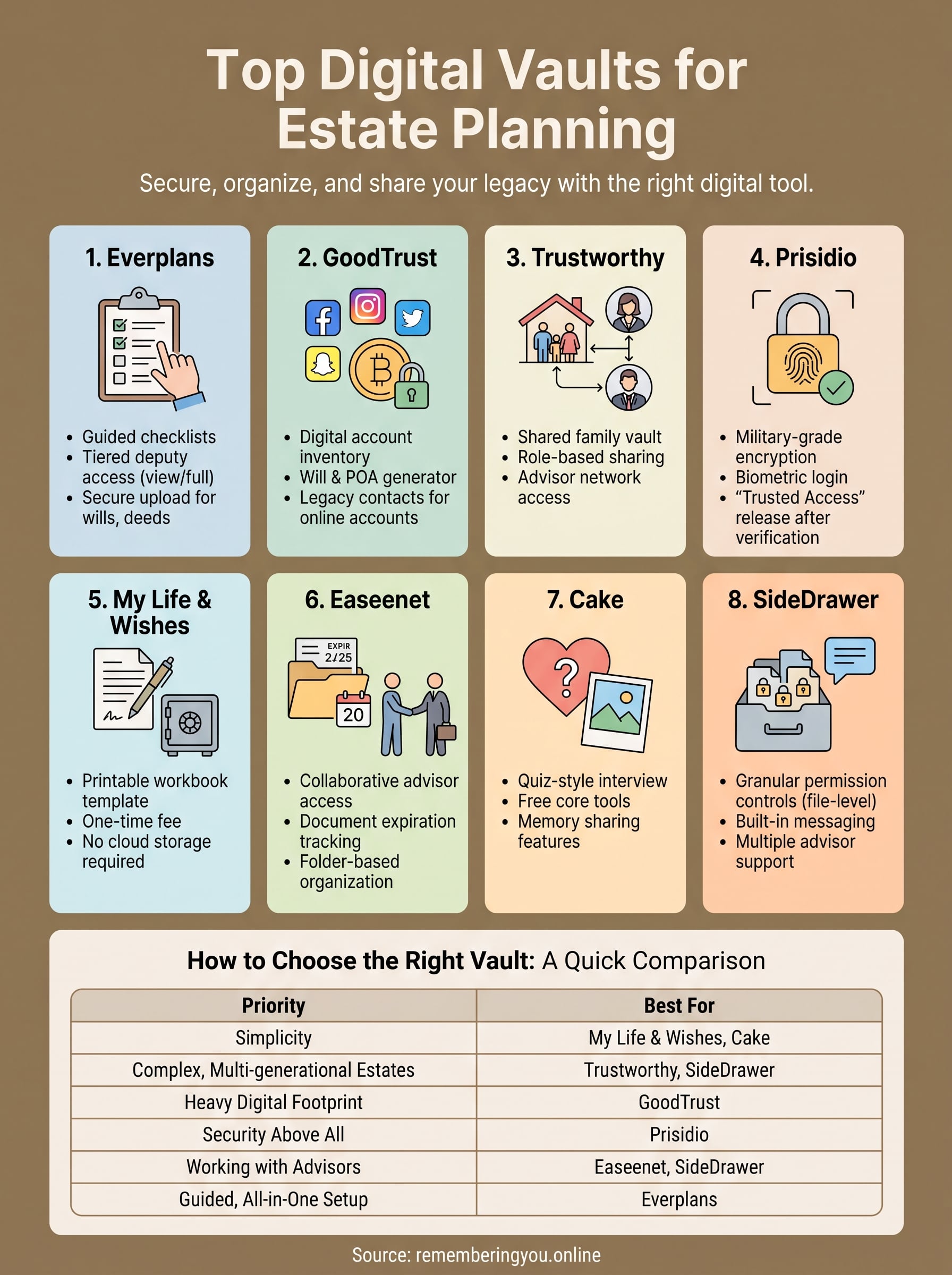
| Priority | Look for |
|---|---|
| Simplicity | My Life & Wishes, Cake |
| Complex, multi-generational estates | Trustworthy, SideDrawer |
| Heavy digital footprint | GoodTrust |
| Security above all | Prisidio |
| Working with advisors | Easeenet, SideDrawer |
| Guided, all-in-one setup | Everplans |
Security certifications matter, but so does whether your spouse or adult child can log in without calling you in a panic. Testing the free tier or trial period before paying tells you more than any feature list. Once you've narrowed it down, confirm the platform supports export in a standard format, so you're never locked into one company's software for something this important.
Making the right choice for your family
Any of these eight platforms will beat leaving your estate documents scattered across drawers and old email accounts. The best digital vaults for estate planning aren't about finding one universal winner, they're about matching a tool to how your family actually communicates and who needs access when the time comes. Pick based on your real situation: a solo filer versus a blended family with three advisors involved need very different tools.
Once your legal paperwork has a home, don't stop there. A digital vault estate planning solution protects deeds and directives, but it won't hold the photos, stories, and voice messages that make someone unforgettable. That's a separate job, and it deserves its own space. Give your family both pieces of the puzzle by creating a digital memorial tribute page with photos, a life story, and a guestbook, free at Remembering You, so the people you love can find not just your paperwork, but you.