
Funeral Program Format: How to Structure the Order of Service
Planning a funeral in a few days is hard enough without staring at a blank page trying to figure out what goes where. If you've been handed the job of putting together the service booklet, you need a funeral program format that makes sense to grieving relatives and gives the officiant something to work from, not a design project.
The short answer: most programs follow a predictable order, cover art or photo, opening words, obituary, order of service, readings or eulogies, closing words, and acknowledgments, with a back page for a final photo or quote. Below you'll find a funeral program example you can copy section by section, plus a sample funeral program laid out for both religious and non-religious services, so you're not guessing at structure while also grieving.
This guide walks through each section in the order it should appear, shows a few funeral program order of service examples for different faiths and styles, and points out the details people forget, like pronouncing names correctly or listing pallbearers. If you're also building a lasting online tribute alongside the printed program, we'll show how a memorial page and QR code can extend that same story past the service itself.
What to gather before you format the program
Before you touch a template, sit down with a notepad and collect the raw material first. You need the full legal name of the deceased, along with any nickname family will expect to see, plus the birth date and death date written the same way you'll want them printed (month day, year works better than numerals for most readers). Ask a family member to confirm spelling on every name that will appear, especially grandchildren's names and any names from a second marriage or blended family. Nothing embarrasses a family faster than a misspelled name in a program that gets handed to two hundred guests.
Next, pull together the people list. This means who the deceased is survived by and who they were preceded in death by, organized by relationship: spouse, children, grandchildren, siblings, parents. Funeral homes usually have a form for this, but if you're building the program yourself, ask a close relative to write it out so you're not guessing at half-siblings or estranged family members who still deserve mention.
Get the names and dates locked down before you touch the layout, because no design fixes a misspelled name.
Photos and keepsakes
Gather more photos than you think you'll need. A cover photo, one or two candid shots for the inside pages, and something for the back cover if you're leaving room for a final image or verse, and it helps to look at ways to arrange photos into a tribute before you choose. Scan physical photos at a decent resolution well before print day; a blurry photo pulled from a group text looks worse in print than it does on a phone screen. If the family has a favorite hymn, poem, or Bible verse tied to the deceased, note it now so it doesn't get lost in the shuffle later.
Also ask about service logistics you'll need for the order-of-service section: officiant's name and title, church or venue name and address, time of visitation versus service, and whether there's a graveside portion afterward. If pallbearers or honorary pallbearers have been chosen, get that list too, since it belongs in most traditional programs.
A quick gathering checklist
- Full name, nickname, birth date, death date
- Survived by / preceded by list, checked by a family member
- Cover photo plus 1-2 additional photos, scanned at print resolution
- Officiant name, venue name and address, service and burial times
- Pallbearer and honorary pallbearer names
- Favorite hymn, poem, or scripture verse
- Names of anyone giving a eulogy or reading
Decide on a digital component early
Many families now pair the printed booklet with a lasting online tribute, since a paper program gets tucked in a drawer but a web page can be updated for years. If you plan to add a QR code that links to a memorial page, decide that now, not the night before printing, so you have the code sized and tested before it goes to the printer. Setting up a free memorial page on Remembering You takes less time than writing the obituary, and it gives out-of-town relatives somewhere to add their own photos, memories, and condolences after the service ends.
Step 1. Choose a layout that fits your service
Once you have your material gathered, pick a physical layout before you open any design software. The funeral program format you choose determines how much text fits on each page and how the whole booklet folds, so this decision shapes everything downstream. Most families choose from four standard layouts, and each one suits a different service length and budget, and you can start from a funeral program layout you download and print for free.
Pick the fold before you pick the fonts, because layout decides how much story you actually have room to tell.
The four common formats
| Layout | Panels | Best for | Typical page count |
|---|---|---|---|
| Single sheet | 1 (front only) | Very short services, graveside-only, or budget printing | 1 |
| Bifold (half-fold) | 4 | Standard church or funeral home services | 4 |
| Trifold | 6 | Longer services with multiple readings or eulogies | 6 |
| Graduated bifold (booklet) | 8+ | Full Catholic Mass or multi-speaker memorial | 8-12 |
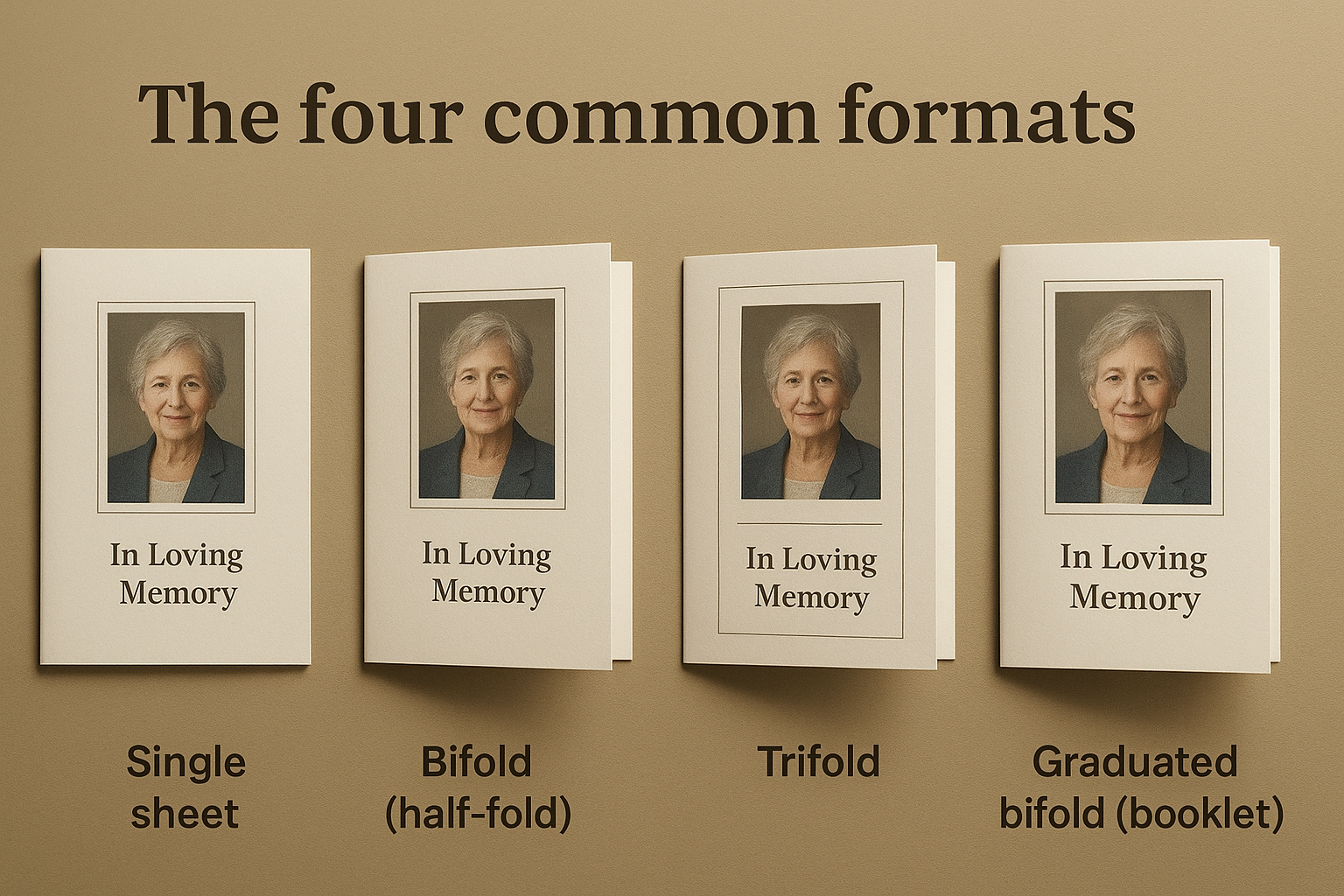
A single sheet works fine for a small graveside gathering where you just need the order of service and a photo. A bifold is the workhorse choice, four panels give you a cover, obituary, order of service, and acknowledgments without crowding any page. If the deceased had a long career, several grandchildren giving readings, or a full Mass with responsorial psalms, move up to a trifold or graduated booklet so the text doesn't shrink below 10-point type just to fit.
Match the format to the service, not the other way around
Consider who's officiating and how long the service runs. A 20-minute graveside service doesn't need six panels of content, and a full funeral Mass with communion rarely fits on one. Estimate your word count first: a typical obituary runs 200-300 words, an order of service list runs another 100-150 words, and each additional reading or hymn adds 40-80 words. Add those up, then match the total to a layout with enough panels to hold it comfortably, with white space around each section rather than text packed edge to edge.
Digital tools help you preview this before you commit to paper. If you're already setting up a page for the deceased, Remembering You's free memorial page builder lets you draft the same biography and photo selection you'll use in the program, so you're not writing the story twice.
Step 2. Build the order of service
With your layout picked, the order of service becomes the spine of the whole booklet. This is the section people actually follow along with during the ceremony, so it needs to match what the officiant plans to say, in the exact sequence they'll say it, which is why it helps to see how a full service program comes together first. Sit down with the officiant or funeral director beforehand and confirm each item, because a program that lists a hymn the pianist never plays creates an awkward pause nobody wants during a service.
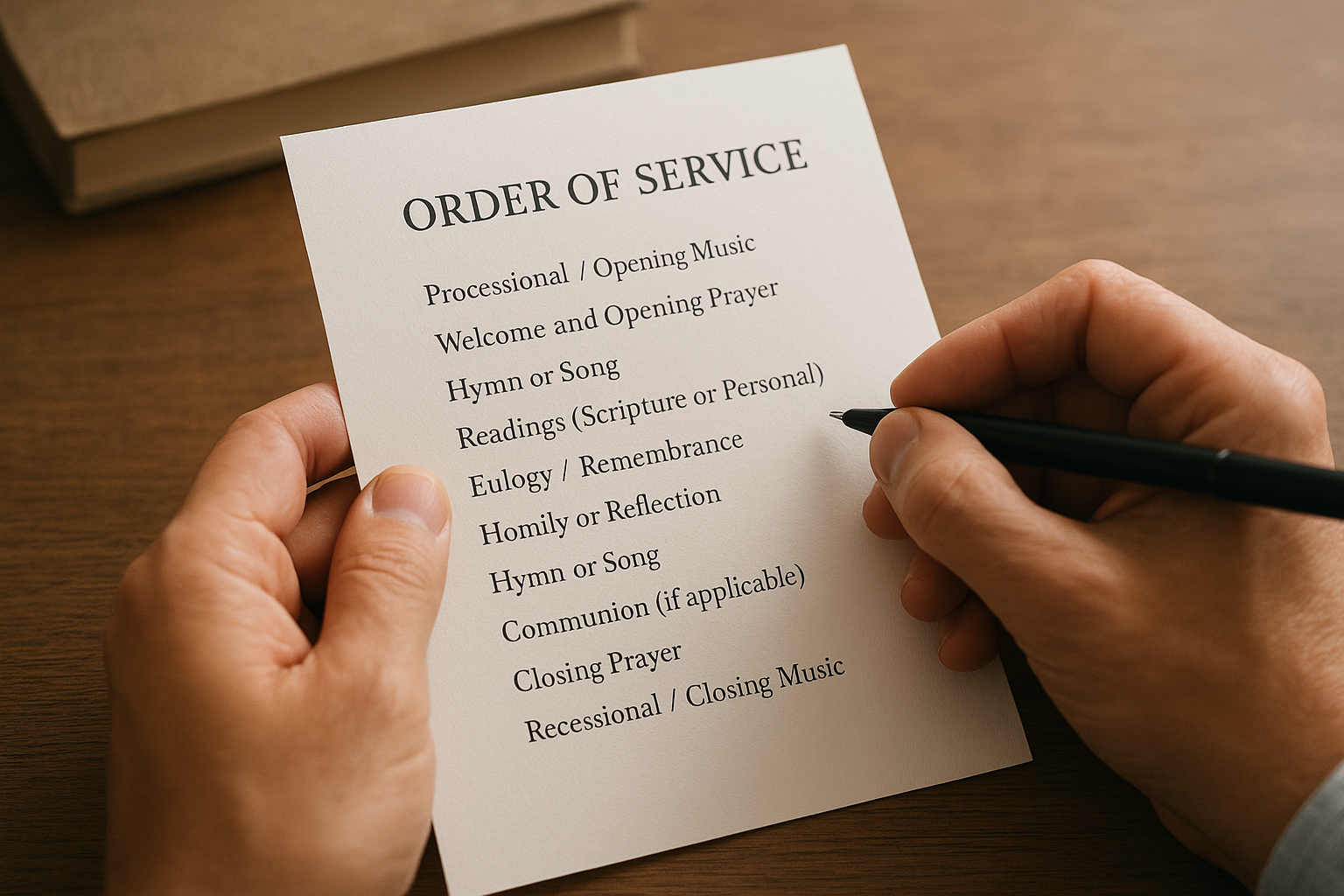
Build the list top to bottom exactly as the ceremony will unfold. Most funeral program order of service examples follow a similar skeleton, whether the service is Catholic, Protestant, or entirely secular, though the specific items shift with the tradition.
Order of Service

Processional / Opening Music
Welcome and Opening Prayer
Hymn or Song
Readings (Scripture or Personal)
Eulogy / Remembrance
Homily or Reflection
Hymn or Song
Communion (if applicable)
Closing Prayer
Recessional / Closing Music
Graveside Committal (if separate)
A program only works if the order on paper matches the order the officiant actually follows.
Adjust for the specific service
Catholic Masses add a responsorial psalm and communion rite, so budget extra panels for those. A celebration-of-life format skips prayers entirely and instead lists multiple speakers by name in the order they'll approach the podium, which matters more than getting a psalm number right. If there's a graveside portion afterward, note it as a separate final line so guests know whether to follow the procession or head straight to their cars.
List names next to each role
Don't just write "Eulogy," write "Eulogy, delivered by James Whitfield, son," and if you're also the one speaking, here's how to put a eulogy together. Guests unfamiliar with the family appreciate knowing who's speaking, and it saves the officiant from having to introduce every name aloud. Do the same for readings, musical performances, and any acknowledgments given by extended family. This small habit turns a generic sample program for a funeral into one that actually reflects the person being remembered, and it gives distant relatives a printed record of who stood up to speak that day.
Step 3. Write the obituary and other core sections
With the order of service locked in, turn to the text that fills the rest of the pages. Most families get stuck here longer than anywhere else, so work section by section rather than trying to write the whole booklet in one sitting. A well-organized sample of funeral program text usually breaks into four blocks: obituary, survived-by list, special acknowledgments, and a closing verse or quote.
Writing the obituary
Keep the obituary to 200-300 words for a standard bifold or trifold, longer if you've moved to a booklet format, and lean on obituary templates and wording examples if the first draft won't come. Open with full name, age, and date of passing, then move chronologically through birthplace, education, career, marriage, and children, before closing with a line about what they loved or how they'll be remembered. Skip flowery language and stick to specific details, the school they attended, the company they worked at for 30 years, the grandkids they spoiled. Specifics are what people actually reread months later.
A good obituary reads like a life, not a resume, so lead with what made this person unmistakably themselves.
Formatting the survived-by list
List relationships in a consistent order so nobody feels overlooked:
Survived by:
Spouse: Maria Gonzalez
Children: James Gonzalez, Elena Ruiz
Grandchildren: Sofia, Marcus, and Diego Ruiz
Siblings: Robert Gonzalez, Ana Torres

Preceded in death by:
Parents: Carlos and Rosa Gonzalez
Brother: Miguel Gonzalez
This format works for a funeral program sample in any tradition, since it's just organized by relationship rather than by faith or ceremony style.
Acknowledgments and closing sections
Add a short thank-you paragraph near the back, thanking pallbearers, the funeral home staff, and anyone who traveled a distance. Close the booklet with a favorite hymn verse, poem, or short scripture passage, set apart from the body text so it reads as a final word rather than another list item.
If you've already built a memorial page, this is the moment to reuse that biography rather than rewrite it twice. Remembering You's page builder lets you publish an obituary online at no cost using the same text, so the printed program and the digital memorial tell the same story in the same words.
Step 4. Format, proofread, and print the program
Once the text is written, shift into layout mode and treat consistency as the main goal. Pick one font family for the whole booklet, one serif for headings and body text works better than mixing three fonts across four panels, and keep body copy at 10-12 point so older relatives can actually read it without squinting. Set margins wide enough that names near the fold don't get eaten by the crease, especially on a bifold or trifold where the gutter can swallow half a word if you're not careful.
Before anything goes to a printer, run the proof past at least two people who didn't write it. A sibling or cousin will catch a misspelled grandchild's name faster than the person who's been staring at the same document for six hours straight. Read every name aloud, since misspellings hide better in print than they do when spoken, and check that dates match across the cover, obituary, and order of service; a program that lists two different birth years is the kind of error a family notices for years afterward.
Print one test copy and read it out loud before you approve two hundred, because a quiet typo becomes a loud one in a room full of mourners.
A proofreading pass worth doing twice
- Confirm every name against the family's list, not your memory
- Check dates match across all sections
- Read the order of service against what the officiant confirmed
- Verify pallbearer names and titles are correct
- Print one physical copy and check the fold before the full run
Choosing paper and print quantity
Standard 24-32 lb paper feels sturdy without adding much cost, and most funeral homes or local print shops can turn a booklet around within a day if you bring a clean PDF rather than a native design file. Order roughly 20% more copies than your expected headcount; programs get taken as keepsakes, mailed to relatives who couldn't attend, and tucked into scrapbooks long after the service ends. Test the fold on one physical copy before approving the full run, since a trifold that looks fine on screen sometimes creases oddly once it's actually printed and bent by hand.
Once the printed funeral program format is locked, add the QR code linking to the online memorial before the final print run, not after, so guests can scan it the same day and keep contributing to the story long after the booklet gets set aside.
A program that reflects the life you're honoring
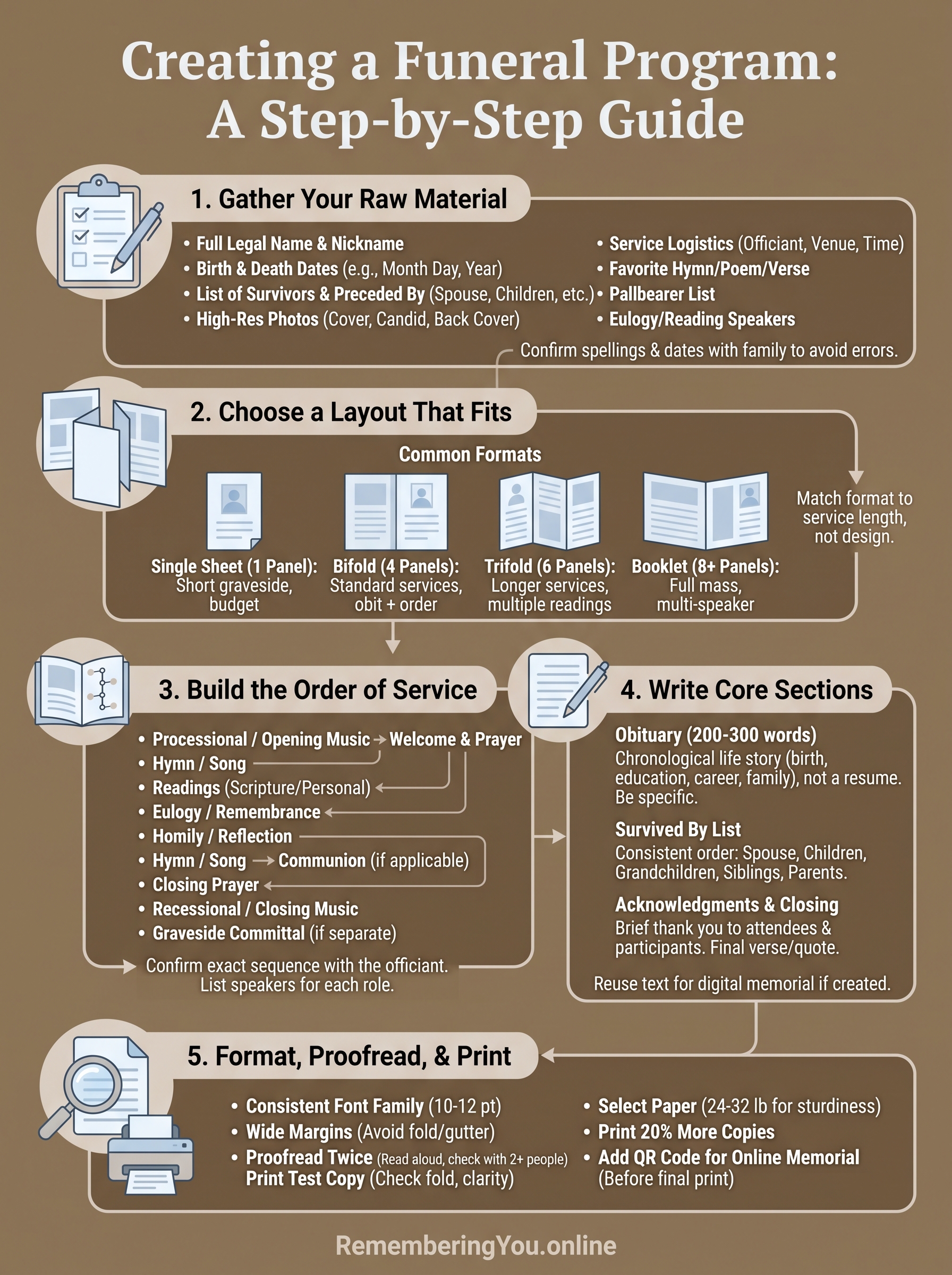
A good funeral program format isn't about fancy design, it's about giving grieving people something they can follow during the service and keep afterward without embarrassment. Gather the names and dates first, pick a layout that matches how long the service actually runs, build the order of service around what the officiant confirmed, and proofread twice before you print two hundred copies. Get those steps right and the booklet does its job quietly, letting the ceremony be about the person, not the paper.
Remember that a printed program has a shelf life measured in years, but a digital memorial keeps growing long after the fold gets worn soft. Pair the two, and relatives who couldn't make the service still get to add their own memory. If you haven't started that piece yet, see how to build a lasting memorial page with photos, a timeline, and a guestbook and drop its QR code onto the back cover before the final print run.